Posts

6 GHz standard power

Image
I'm reviewing limitations of low power indoor (LPI) and standard power (SP) for 6 GHz in the FCC regulatory domain. There's been some discussion about the benefits of SP indoors, but my experience has been that the complexity, limitations, and risk of SP outweigh the benefits. I prefer to install LPI models wherever possible unless there is a specific need for power, weatherproofing, or external antennas. Especially in high density environments, I really want to be able to use 47.5% more channels that are in U-NII 6 and 8 when using LPI compared to SP. This likely is significantly more impactful to total system performance than being able to increase power and MCS rates. Aruba AP-675 in an outdoor space Standard Power 6 GHz - requires daily location/AFC check-in, else 6 GHz radio is disabled - limited to 40 of 59 channels or less, depending on AFC response - higher max power possible, depending on AFC response - allows external antennas - allows outdoor models Low Power Indoo...

DNS entries needed for MLB app

I have a pi-hole DNS server and fairly aggressive block lists from https://firebog.net/ . The MLB TV android app was crashing until I whitelisted this google entry. It looks like it's for serving ads in the app. imasdk.googleapis.com These other entries can stay blocked and the app still worked. X   api.onesignal.com X   mlb.sc.omtrdc.net X   api.branch.io X   assets.adobedtm.com X   mlb.siteintercept.qualtrics.com X   udm.scorecardresearch.com X   b.scorecardresearch.com X   datadoghq.eu X   demdex.net X   app-measurement.com X   conviva.com

Simple powershell ping log with timestamp

Here's a quick and dirty script that will ping with a timestamp, and save the ouput to a text file. I have used pingInfoView quite a bit, but sometimes this fits the situation better. $hostAddress = Read-Host -Prompt 'IP Address or Hostname' $fileName = Read-Host -Prompt 'Output file' ping.exe -t $hostAddress|Foreach{"{0} - {1}" -f (Get-Date),$_}| Tee-Object -file $fileName

Communication medium effectiveness matrix

Different communication methods and how effective they are in each of the following (usually) desirable categories. Convenience How quick and simple can this be used without a lot of setup. Speed Ability to get the message to someone timely. Tracking Is the communication recorded, or can it be verified at a later date. Personal How much the communication naturally builds your personal/professional relationship with others. Ubiquitous The degree that everyone has access and the ability to use this communication method. Understanding How effective the method is at conveying your intended meaning. Convenience Speed Tracking Personal Ubiquitous Understanding Total Email Med Med High Low High Med 20 Slack High High Med Low Med Med 20 Text Med H...

OBi 200/202 no audio but call connects

Image
After installing a Palo Alto PA-220 with standard policies, there were several things that were broken. VOIP phone through Google Voice/OBi analogue - no audio on any call (STUN over port 19305) Speedtest.net find server and tests would not complete (SSL over port 8080) Our washer and drier were no longer sending notifications when laundry was done (SSL over 46030) External Plex server (SSL over port 32400) The offender was the default outbound policy to the internet/WAN. While the source/destination are any/any, the Service specified is application-default which basically means that if services are using non-standard ports they won't be allowed in this policy. There weren't any indications of dropped traffic in the logs, because default policies are not logged in Palo Alto devices by default, and this traffic was getting denied by the interzone-default policy. To resolve this easily, just change application-default to any. However, you may want to see wha...

Microsoft Edge Memory Leak

Image
I had one tab open in Microsoft Edge, and it was using over 5 GB of memory. Memory leak much? Yet Microsoft wanted to close Firefox.

Installing residential network wiring

Image
The goal of this project was to install network wiring throughout a house that only had the cable line in from the ISP. The house is a split level with four levels. The bottom basement is unfinished, but also has the cable line and modem installed on an unfinished wall. The primary need for this project was to wire up the bedroom used as an office, so wireless wouldn’t be the only option. As an initial solution, I bridged an old Linksys router to our main wireless access point. This provided wired connections in the office without having to run wires the entire way. However, the Linksys router was slower than the bandwidth from the ISP, and was likely slowing down the wireless for all other connected devices. The router was also unreliable and required rebooting every few days. This was not the ideal situation to work on computers that might have other networking problems. Also, I felt that if I was not getting the full bandwidth from the ISP, I was cheating myself. One...

Remove browser hijacker malware

For conduit, white smoke, babylon, anything opencandy ( http://en.wikipedia.org/wiki/OpenCandy ), and other browser hijackers I usually do the following. 1. uninstall these and anything unrecognizable from add/remove 2. in EACH browser   a. remove any add-ins/extensions   b. change the default web page/home page   c. remove any search engines that you don't recognize, set default to google 3. delete anything from c:\program files, c:\users\appdata that appears to be from the malware 4. run a full scan of Malwarebytes, and possibly other scans 5. probably also a good idea to clear your cache and cookies I also heard that some trovi malware is also changing browser shortcuts on the desktop, and has a scheduled task to change these shortcuts. I haven't seen this personally, but it's worth checking. Apparently ADWcleaner is good at removing this. My rule of thumb is that if it takes longer than 30 minutes to an hour to fix I'm going to re-install ...

Delay dropbox startup in Windows

Image
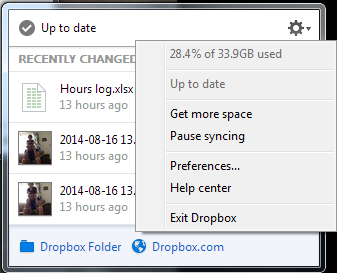
Dropbox was slowing down my startup after logging in, so I wanted to delay startup by a minute or so to allow my computer to be usable earlier. The normal settings only allow it to either start up immediately, or entirely manually. Below are instructions on how I got it to start after 2 minutes. I did this in Windows 7, but it should work similarly in Windows 8, 8.1, and probably Windows 10. This also works with other programs, so you could stagger startup items instead of having them all hammer the system at once. 1. Disable the normal dropbox startup.   a. Click on the dropbox icon, click the gear icon, and click Preferences...   b. Uncheck "Start Dropbox on system startup". Click OK 1. a. Click Preferences... 1. b. Uncheck Start on system startup 2. Open the task scheduler.   a. From the Start menu, click All Programs, Accessories, System Tools, and Task Scheduler.   This can also be found in the control panel under System & Se...

Lockdown Browser 1.0.7.02 LAB SCCM deployment

Image
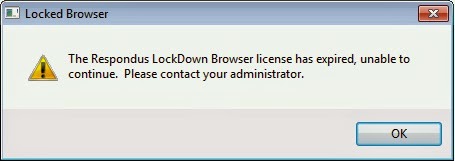
I needed to update from Respondus LockDown Browser Lab version 1.0.5.14 to version 1.0.7.02. This is how I've done it as an SCCM application. This could probably be modified to be used in some other deployment solution, but I've tested it with SCCM 2012 R2 and Windows 7 clients running 32 and 64 bit versions. After 1.0.7.02 was activated this error shows on 1.0.5.14 Install Shield files and installer folder First, you'll need to create setup.iss files. Instructions can be found here:  http://www.respondus.com/update/2009-11-d.shtml Here's their instructions for convenience: First, be sure that Respondus LockDown Browser isn’t already installed on the computer. If it is, then un-install it before continuing. Download the full installer (LockDownSFX.exe) from the Respondus website.  BE SURE  to obtain the .exe via the admin login for your institution since the installer differs for each institution. Run the installer and select the "Click Here...

UNBEATABLE Tic Tac Toe Game

Image
Click the link to download an unbeatable Tic-Tac-Toe game. It's possible to get a CAT game or lose, but the computer will never lose! You can also play two player if you want to have the possibility of winning. https://dl.dropbox.com/u/2509724/TTT.exe One player will be against the computer, two player will be against a friend (same computer) Player one to choose X or O The Computer Wins! I created the program in high school after completing all of the assignments for the class. It was created with Visual Basic 6 with about 1200 lines of code. The program is fully functional, but certainly not polished. It was created pretty simply, e.g. the computer is not performing strategy, just making the pre-programmed best move, as Tic-Tac-Toe is a pretty simple game if you think about it. I also created a minesweeper game similar to the windows one, but I had a few bugs that I could never iron out. Sadly, I think I left that one on the classroom computer and don...

Wild Ones

Image

Bootable external drive for Windows & OSX

Image
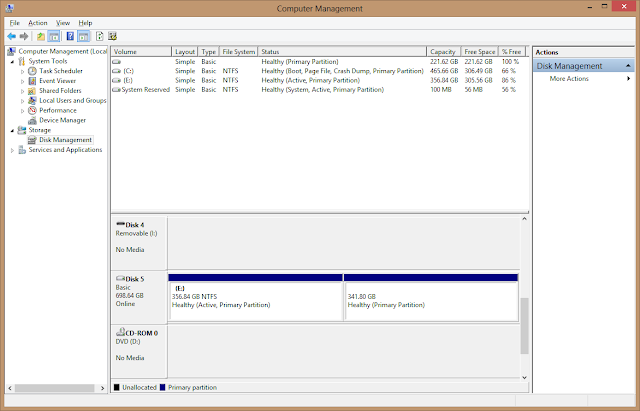
This is how I created a bootable external drive with two partitions: One for WDS/Ghost etc. and the other for OSX install disk. For my drive, I've got a custom WinPE startup OS, and the OS 10.8 install image. The end result is an external drive that I can use to image or backup almost any computer that I come across. Below are the steps that I took to create the drive, but I'll cut to what I got hung up on: The Windows partition must be Active or your machine won't boot to it . Restoring the OSX image will remove this from the NTFS partition. 1. Create your Windows partition. (these steps can also be done in disk management) Run CMD as an administrator (you must right click on CMD and run as administrator, not just be logged in as an administrator)  In CMD, run diskpart  list disk  select disk <#>    clean (! will remove all current partitions !)  create partition primary size=<n> (MB)  active  format fs=ntfs quick...

Windows 7 MySQL installation error service account

Image
When installing MySQL 5.5 on a Windows 7 machine, I received this error: "an unknown error occurred while validating the service account" and the installation would not complete, and I also got a configuration error with something like "unable to configure service". After googling a bit and playing around with the settings, the answer was pretty simple. The default administrator account needs to be enabled . Although this was a pretty easy answer, I couldn't find it anywhere! Result after enabling the default administrator account Sorry I don't have more screen-shots, but I think it's pretty self explanatory. I may or may not add more later.

Texting is just like faxing

It doesn't seem like texting (SMS) has much to do with fax machines. Perhaps not technically, but I will argue that the two technologies are very similar in the way we use them. At first I just wanted to compare the two tools of communication and how similar they seem. However, what I really want to say is that both of these tools are absolutely useless, and if you have either one, you are just giving your money away for something that is already free. The most important thing that they have in common is that both technologies are obsolete, yet are still widely used. Worse, these technologies have free alternatives, but many many people are still paying large monthly fees to keep the service running. A lot of money is spent to keep us backwards compatible for those that only have these ancient forms of communication and refuse to use something better. The short answer is that internet access has replaced these tools, yet many still are clinging to that old familiar fax or text. ...

Embedding File Hangs Office

I ran into the problem when embedding files into a Word document. I was using Office 2007, but this may be a problem in other versions. Word says that it is waiting for another application to complete an OLE action . What I had to do is open the task manager and end acroread.exe or whatever pdf program was running. After that I could embed the file successfully. I'll upload screen-shots if I ever run into it again.

Print Screen Active Window Only Shortcuts

Print screen the active window only by pressing ALT + Print Screen . On a mac you press Command + Shift + 4 then  Space-bar , then click the window . Mac: Just a quick tip for reference. There's a more comprehensive tutorial for macs here:  http://osxdaily.com/2010/05/13/print-screen-mac/  or  http://graphicssoft.about.com/od/screencapturemac/ht/macscreenshot.htm Windows: If you want to capture a selected area in windows, you can do it if you have One Note installed with Windows + S , or from the Insert menu in OneNote, select screen clipping.  You can also use the screen snipping tool in Windows Vista or 7. Here's a good tutorial on how to assign a shortcut to the snipping tool:  http://www.howtogeek.com/howto/windows-vista/assign-a-shortcut-key-to-the-snipping-tool-in-windows-vista/

CMD Print DIR to text file

dir > print.txt The ">" symbol is telling to put the output of the command to whatever is next. In this case "print.txt". This is useful for writing any output to a file in a script or whatever. Example: dir > %USERPROFILE%\Desktop\print.txt This example will print the directory listing to print.txt on your desktop. Other flags: dir /b file names only dir /s include all sub folders & files Original source:  http://www.computerhope.com/issues/ch000772.htm Actually I really like that site, and spent some time taking their quiz. Entertaining.

CMD combine CSV files into one

Image
I had the need to combine several CSV (excel) files into one file. The set was long enough that even opening them and copy/pasting would take over an hour. This little trick will do it in a few seconds. (in windows) 1. Put all of your files in the same folder. They all need to be CSV format and should be the only CSV files in the folder. You may want to remove headers from your spreadsheets if you don't want them later. 2. Open a command prompt. Windows+R > cmd This should be the normal command prompt because it doesn't work in powershell. 3. Navigate to the folder with your .csv files 4. type " copy *.csv newfilename.csv " 5. A new file named "newfilename.csv" will show up in the same folder. If you wanted to copy it somewhere else you could run copy *.csv path\newfilename.csv. Example: copy *.csv  %USERPROFILE%\Desktop\newfile.csv This will copy all the CSV files from the folder you are in to a file on your desktop named newfile.csv...

Save communicator chat history in outlook

For some reason, our installation of communicator was set not to save any messages by default, but it did save my call history.  Since I don't have any juicy communications at work, I don't have any problem saving everything in communicator. I save those chats for gchat. By the way, administrators of communicator can view your conversations in communicator, so I would be careful when using it. They also control if these settings are available, so you might not be able to change much anyways. When this option is selected, your chat messages and history will be saved to a folder in Outlook named "Conversation". (Image) Enabling this is very easy. It's done in Communicator, NOT in Outlook. 1. In Communicator go to file, tools, options... 2. Check the box that says " Save my instant message conversations in the Outlook Conversation History folder" After restarting you will have a folder in Outlook that will save your chats from now on. Here ...