Posts

Showing posts with the label Users Folder

Windows 7 Shared folder on All Users Desktop
Image
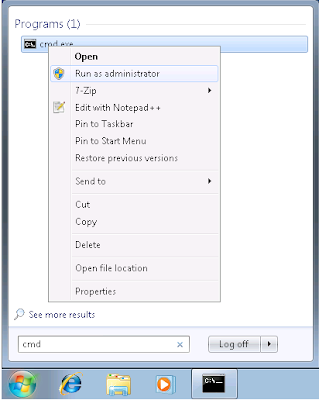
This is very similar to a previous post that I've done, but I thought it is worth mentioning since this is done differently than XP. I wanted to create a shortcut to a shared folder for all users that log in to a Windows 7 machine. In XP, you can just create a shared folder in shared documents, and create a shortcut to it in the all users desktop. In Windows 7 you can't do this, so you'll have to create a symbolic link. 1. Create the folder you want to link. I just created a folder named "Shared" in C:\Users\Public\Documents. Everyone already has access to this folder, but it's not super easy to find. 2. Open the command prompt as administrator. (find "cmd" and right-click then click run as admin, you'll see administrator in the window title) 3. Run this command to create the link:  "mklink /J C:\Users\Public\Desktop\Shared C:\Users\Public\Documents\Shared"
Move Windows 7 Users folder to another drive

Image
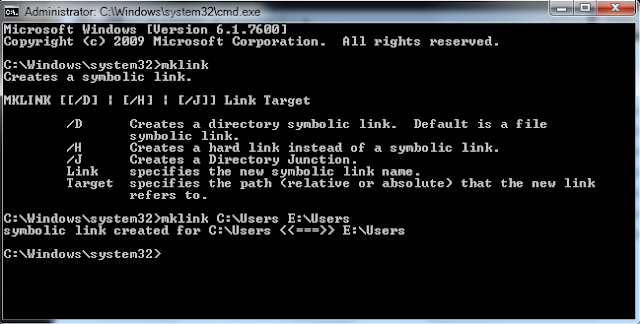
If you've already installed your operating system and want to move the entire Users folder to another drive use these instructions. This will create a symbolic link which will leave the operating system using the same path to avoid breaking anything pointed to the Users through the C drive. You will still be able to get to this directory through the normal C:\Users path. This is an alternative to making changes with the unattend.xml file on installation. Moving the Users Folder 1. Copy C:\Users to your secondary drive, or wherever you want it to be located. This works best if you boot into a Linux disc or some other boot drive since windows will lock files while you are logged in. If you have a WinPE disc, you can make all these changes at once. 2. Rename, delete, or move the original folder after making sure that the files have copied. It is difficult to rename that folder while you are logged in to the operating system, so I would do this step while booted to another drive....