Posts

Showing posts with the label network

OBi 200/202 no audio but call connects

Image
After installing a Palo Alto PA-220 with standard policies, there were several things that were broken. VOIP phone through Google Voice/OBi analogue - no audio on any call (STUN over port 19305) Speedtest.net find server and tests would not complete (SSL over port 8080) Our washer and drier were no longer sending notifications when laundry was done (SSL over 46030) External Plex server (SSL over port 32400) The offender was the default outbound policy to the internet/WAN. While the source/destination are any/any, the Service specified is application-default which basically means that if services are using non-standard ports they won't be allowed in this policy. There weren't any indications of dropped traffic in the logs, because default policies are not logged in Palo Alto devices by default, and this traffic was getting denied by the interzone-default policy. To resolve this easily, just change application-default to any. However, you may want to see wha...

Installing residential network wiring

Image
The goal of this project was to install network wiring throughout a house that only had the cable line in from the ISP. The house is a split level with four levels. The bottom basement is unfinished, but also has the cable line and modem installed on an unfinished wall. The primary need for this project was to wire up the bedroom used as an office, so wireless wouldn’t be the only option. As an initial solution, I bridged an old Linksys router to our main wireless access point. This provided wired connections in the office without having to run wires the entire way. However, the Linksys router was slower than the bandwidth from the ISP, and was likely slowing down the wireless for all other connected devices. The router was also unreliable and required rebooting every few days. This was not the ideal situation to work on computers that might have other networking problems. Also, I felt that if I was not getting the full bandwidth from the ISP, I was cheating myself. One...

Texting is just like faxing

It doesn't seem like texting (SMS) has much to do with fax machines. Perhaps not technically, but I will argue that the two technologies are very similar in the way we use them. At first I just wanted to compare the two tools of communication and how similar they seem. However, what I really want to say is that both of these tools are absolutely useless, and if you have either one, you are just giving your money away for something that is already free. The most important thing that they have in common is that both technologies are obsolete, yet are still widely used. Worse, these technologies have free alternatives, but many many people are still paying large monthly fees to keep the service running. A lot of money is spent to keep us backwards compatible for those that only have these ancient forms of communication and refuse to use something better. The short answer is that internet access has replaced these tools, yet many still are clinging to that old familiar fax or text. ...

Remote Desktop to Windows 7 from XP

Image
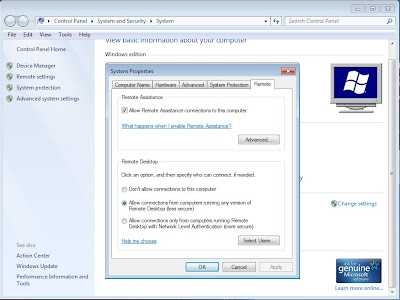
By default you cannot remote desktop (mstsc) into a machine running Windows 7. This is a pretty easy fix, but I had to search a little bit for the solution. First of all, you will want to be in the same workgroup or domain. If you are not, then you may need to fully qualify the name of the machine when remoting into it. (ie machine.domain.network or something) Enable Remote Desktop on Windows 7 1. Right Click on My Computer 2. Click Properties 3. Click on Remote Settings in the menu on the left 4. Change the radio button from "Don't allow connections to this computer" to "Allow connections from computers running any version of Remote Desktop" (if you select the bottom one then you will not be able to remote from XP) 5. If there are any users that are not administrators of the computer, you can add them by clicking "Select Users" and adding their account. Otherwise they will get an error about terminal services when they try to use Remote Desktop. 5. Cl...