Posts

Showing posts with the label windows

Microsoft Edge Memory Leak

Image
I had one tab open in Microsoft Edge, and it was using over 5 GB of memory. Memory leak much? Yet Microsoft wanted to close Firefox.

Remove browser hijacker malware

For conduit, white smoke, babylon, anything opencandy ( http://en.wikipedia.org/wiki/OpenCandy ), and other browser hijackers I usually do the following. 1. uninstall these and anything unrecognizable from add/remove 2. in EACH browser   a. remove any add-ins/extensions   b. change the default web page/home page   c. remove any search engines that you don't recognize, set default to google 3. delete anything from c:\program files, c:\users\appdata that appears to be from the malware 4. run a full scan of Malwarebytes, and possibly other scans 5. probably also a good idea to clear your cache and cookies I also heard that some trovi malware is also changing browser shortcuts on the desktop, and has a scheduled task to change these shortcuts. I haven't seen this personally, but it's worth checking. Apparently ADWcleaner is good at removing this. My rule of thumb is that if it takes longer than 30 minutes to an hour to fix I'm going to re-install ...

Delay dropbox startup in Windows

Image
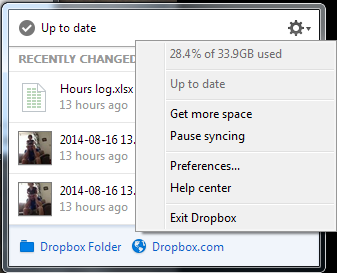
Dropbox was slowing down my startup after logging in, so I wanted to delay startup by a minute or so to allow my computer to be usable earlier. The normal settings only allow it to either start up immediately, or entirely manually. Below are instructions on how I got it to start after 2 minutes. I did this in Windows 7, but it should work similarly in Windows 8, 8.1, and probably Windows 10. This also works with other programs, so you could stagger startup items instead of having them all hammer the system at once. 1. Disable the normal dropbox startup.   a. Click on the dropbox icon, click the gear icon, and click Preferences...   b. Uncheck "Start Dropbox on system startup". Click OK 1. a. Click Preferences... 1. b. Uncheck Start on system startup 2. Open the task scheduler.   a. From the Start menu, click All Programs, Accessories, System Tools, and Task Scheduler.   This can also be found in the control panel under System & Se...

Lockdown Browser 1.0.7.02 LAB SCCM deployment

Image
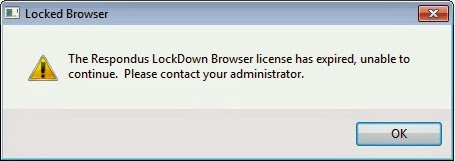
I needed to update from Respondus LockDown Browser Lab version 1.0.5.14 to version 1.0.7.02. This is how I've done it as an SCCM application. This could probably be modified to be used in some other deployment solution, but I've tested it with SCCM 2012 R2 and Windows 7 clients running 32 and 64 bit versions. After 1.0.7.02 was activated this error shows on 1.0.5.14 Install Shield files and installer folder First, you'll need to create setup.iss files. Instructions can be found here:  http://www.respondus.com/update/2009-11-d.shtml Here's their instructions for convenience: First, be sure that Respondus LockDown Browser isn’t already installed on the computer. If it is, then un-install it before continuing. Download the full installer (LockDownSFX.exe) from the Respondus website.  BE SURE  to obtain the .exe via the admin login for your institution since the installer differs for each institution. Run the installer and select the "Click Here...

Bootable external drive for Windows & OSX

Image
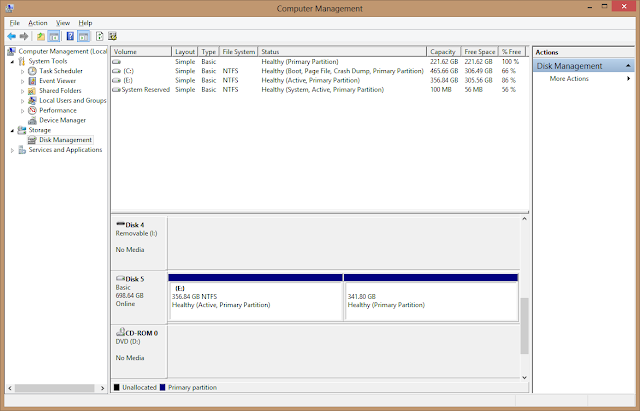
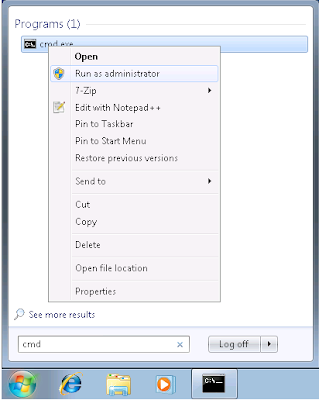
This is how I created a bootable external drive with two partitions: One for WDS/Ghost etc. and the other for OSX install disk. For my drive, I've got a custom WinPE startup OS, and the OS 10.8 install image. The end result is an external drive that I can use to image or backup almost any computer that I come across. Below are the steps that I took to create the drive, but I'll cut to what I got hung up on: The Windows partition must be Active or your machine won't boot to it . Restoring the OSX image will remove this from the NTFS partition. 1. Create your Windows partition. (these steps can also be done in disk management) Run CMD as an administrator (you must right click on CMD and run as administrator, not just be logged in as an administrator)  In CMD, run diskpart  list disk  select disk <#>    clean (! will remove all current partitions !)  create partition primary size=<n> (MB)  active  format fs=ntfs quick...

Windows 7 MySQL installation error service account

Image
When installing MySQL 5.5 on a Windows 7 machine, I received this error: "an unknown error occurred while validating the service account" and the installation would not complete, and I also got a configuration error with something like "unable to configure service". After googling a bit and playing around with the settings, the answer was pretty simple. The default administrator account needs to be enabled . Although this was a pretty easy answer, I couldn't find it anywhere! Result after enabling the default administrator account Sorry I don't have more screen-shots, but I think it's pretty self explanatory. I may or may not add more later.

Embedding File Hangs Office

I ran into the problem when embedding files into a Word document. I was using Office 2007, but this may be a problem in other versions. Word says that it is waiting for another application to complete an OLE action . What I had to do is open the task manager and end acroread.exe or whatever pdf program was running. After that I could embed the file successfully. I'll upload screen-shots if I ever run into it again.

Print Screen Active Window Only Shortcuts

Print screen the active window only by pressing ALT + Print Screen . On a mac you press Command + Shift + 4 then  Space-bar , then click the window . Mac: Just a quick tip for reference. There's a more comprehensive tutorial for macs here:  http://osxdaily.com/2010/05/13/print-screen-mac/  or  http://graphicssoft.about.com/od/screencapturemac/ht/macscreenshot.htm Windows: If you want to capture a selected area in windows, you can do it if you have One Note installed with Windows + S , or from the Insert menu in OneNote, select screen clipping.  You can also use the screen snipping tool in Windows Vista or 7. Here's a good tutorial on how to assign a shortcut to the snipping tool:  http://www.howtogeek.com/howto/windows-vista/assign-a-shortcut-key-to-the-snipping-tool-in-windows-vista/

CMD Print DIR to text file

dir > print.txt The ">" symbol is telling to put the output of the command to whatever is next. In this case "print.txt". This is useful for writing any output to a file in a script or whatever. Example: dir > %USERPROFILE%\Desktop\print.txt This example will print the directory listing to print.txt on your desktop. Other flags: dir /b file names only dir /s include all sub folders & files Original source:  http://www.computerhope.com/issues/ch000772.htm Actually I really like that site, and spent some time taking their quiz. Entertaining.

Only one processor showing XP

This fix is if Windows XP is only showing one processor on a multi processor/core machine. 1. Boot to safe mode with networking  2. Delete (or rename) the following if they exist from C:\WINDOWS\System32\ hal.dll ntoskrnl.exe ntkrnlpa.exe (Check for these. They usually do not exist but delete them if they do) halmacpi.dll ntkrnlmp.exe ntkrpamp.exe 3. Copy the following into C:\WINDOWS\System32\ from the files described in the bottom note. hal.dll ntkrnlpa.exe ntoskrnl.exe 4. Reboot and it should fix itself the rest of the way.   NOTE: The new files in step 3 were taken from the originals which can be found on other machines in C:\WINDOWS\ServicePackFiles\i386: halmacpi.dll renamed to –>HAL.DLL ntkrnlmp.exe renamed to –>ntoskrnl.exe ntkrpamp.exe renamed to –>ntkrnlpa.exe

Admin Group Policy fails to apply

Problem:  Group Policy doesn't apply, but gpresult doesn't show any problem. Some Policies are working on the same computer The same policy is working on other computers The windows log has an error with something like this: The client-side extension could not remove computer policy settings for ' ' because it failed with error code '0x8007000d The data is invalid.' See trace file for more details. Solution: Delete all files in this path:  C:\ProgramData\ Microsoft\Group Policy\History In Windows XP: D:\Documents and Settings\All Users\Application Data\Microsoft\Group Policy\History In a command window run "gpupdate /force" I ran into a problem where our administrator group policy was not applying for some reason, while other policies were applying. I could not find any information in gpresult or in any group policy settings or information. The policy is the same that is on all the other machines in the domain, and was working, except f...

Windows 7 Shared folder on All Users Desktop

Image
This is very similar to a previous post that I've done, but I thought it is worth mentioning since this is done differently than XP. I wanted to create a shortcut to a shared folder for all users that log in to a Windows 7 machine. In XP, you can just create a shared folder in shared documents, and create a shortcut to it in the all users desktop. In Windows 7 you can't do this, so you'll have to create a symbolic link. 1. Create the folder you want to link. I just created a folder named "Shared" in C:\Users\Public\Documents. Everyone already has access to this folder, but it's not super easy to find. 2. Open the command prompt as administrator. (find "cmd" and right-click then click run as admin, you'll see administrator in the window title) 3. Run this command to create the link:  "mklink /J C:\Users\Public\Desktop\Shared C:\Users\Public\Documents\Shared"

Bypass Cisco NAC Agent

Image
The Cisco NAC agent is run either in Java or ActiveX to check your windows update and virus definition status. If your operating system or antivirus is not up to date, you won't be able to fully access the (wireless) network until you install the required updates. This is all nice, except that it doesn't tell you what updates are required, which ones failed, and it sometimes takes an hour or more to update your machine. This, plus the fact that there is a ridiculously small amount of time between the new updates being released and them being required. This makes your computer fail to access the network at the most inconvenient times. I've found myself spending many class periods failing to listen or take notes because I had to get connected. Here's how you can get logged on without having to even run the NAC agent. Simply put, change your operating system to either Mac, or Linux. Rather, change what your web browser is reporting as your operating system. Currently the...

Active Directory Users and Computers and Group Policy Management

I keep forgetting where to get the tool to install these two programs: Active Directory Users and Computers  Group Policy Manageme nt They are both in the same package, but the package is different depending on what version of windows you have. It used to be called the Administration Tools Pack , but now it is called the Remote Server Administration Tools . It throws me off every time I try to search for it. Hopefully this will save someone a few minutes of searching. Links are below. Windows XP or Server 2003 Windows Server 2003 Administration Tools Pack (adminpak.exe or just adminpak) http://www.microsoft.com/downloadS/details.aspx?FamilyID=c16ae515-c8f4-47ef-a1e4-a8dcbacff8e3&displaylang=en Vista x86 Microsoft Remote Server Administration Tools for Windows Vista http://www.microsoft.com/downloads/details.aspx?FamilyId=9FF6E897-23CE-4A36-B7FC-D52065DE9960&displaylang=en Vista x64 Microsoft Remote Server Administration Tools for Windows Vista for x64-based ...

Windows Keychain?

Image
I had no idea that windows itself can save passwords, similar to OS keychain. Unfortunately this can be a security issue since your credentials are saved on a machine. It can also cause some network resources to stop connecting if your computer continues to use credentials that are no longer valid. We got an error in the windows logs with something like this: "Group Policy object did not apply because it failed with error code '0x80070005 Access is denied.' This error was suppressed." The way we fixed it was to remove the saved credentials. You can manage this by running the following in a run window: rundll32.exe keymgr.dll, KRShowKeyMgr You can also get to it this way in Windows 7 Pro. It's called the Credential Manager or Vault. Windows 7 Credential Manager 1. Click Start, then Control Panel 2. Click User Accounts and Family Safety 3. Click on Credential Manager In Windows 7 there is a slightly different interface than opening the key manager from the run menu,...

Remote Desktop to Windows 7 from XP

Image
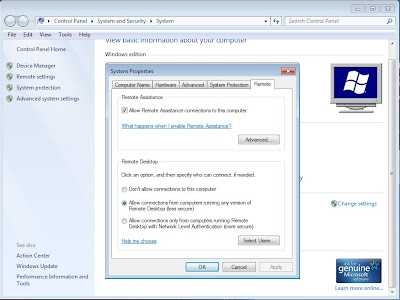
By default you cannot remote desktop (mstsc) into a machine running Windows 7. This is a pretty easy fix, but I had to search a little bit for the solution. First of all, you will want to be in the same workgroup or domain. If you are not, then you may need to fully qualify the name of the machine when remoting into it. (ie machine.domain.network or something) Enable Remote Desktop on Windows 7 1. Right Click on My Computer 2. Click Properties 3. Click on Remote Settings in the menu on the left 4. Change the radio button from "Don't allow connections to this computer" to "Allow connections from computers running any version of Remote Desktop" (if you select the bottom one then you will not be able to remote from XP) 5. If there are any users that are not administrators of the computer, you can add them by clicking "Select Users" and adding their account. Otherwise they will get an error about terminal services when they try to use Remote Desktop. 5. Cl...

Windows 7 Drivers for ASRock 939dual-SATA2

Image
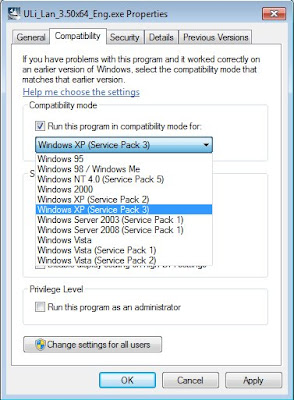
I recently installed Windows 7 Pro x64 on my desktop and almost all of the drivers were automatically installed. Two important ones were not: Onboard LAN and my SB Audigy 2 card. The ASRock website ( http://www.asrock.com/mb/download.asp?Model=939Dual-SATA2&s=939 ) only has XP drivers, which won't work unless you run it in compatibility mode. This is pretty simple: Windows 7 Compatability Mode: 1. Right click on executable 2. Select properties 3. Click on the Compatability tab 4. Check "Run this program in compatibility mode for:" 5. Select Windows XP (Service Pack 3) 6. Click OK and run the program As for the audio, since I don't use the onboard audio I haven't checked to see if it works although I have read about other people having issues. Even though this board has 7.1 channel sound I don't recommend using it because there was a lot of static noise. At least for me.

Windows 7 Installation

Like many university students I am able to participate in the MSDNAA. Therefore I was compelled to postpone my studies and install Windows 7 on my desktop at home. I started out fairly confident as I had already installed the Beta, RC, and enterprise release on several computers at work including a VM, and I'm pretty good at this type of thing by now. However this one almost defeated me. I can usually handle one or two things going wrong, but it seems that everything went wrong this time. One, the download from MSDNAA was corrupted twice for me, so I had to get an ISO from an alternative source. On top of that, Roxio was not able to correctly burn to DVD as I had suspected from searching forums. I had to download IMGBurn which works great. One of these problems was giving me an error about "CD/DVD driver missing". Third, my system has three different types of RAM, one of the types being a pair. The system will get memory errors unless the sticks of memory are placed in ju...