Posts

Showing posts with the label Windows 7

Windows 7 MySQL installation error service account

Image
When installing MySQL 5.5 on a Windows 7 machine, I received this error: "an unknown error occurred while validating the service account" and the installation would not complete, and I also got a configuration error with something like "unable to configure service". After googling a bit and playing around with the settings, the answer was pretty simple. The default administrator account needs to be enabled . Although this was a pretty easy answer, I couldn't find it anywhere! Result after enabling the default administrator account Sorry I don't have more screen-shots, but I think it's pretty self explanatory. I may or may not add more later.
Admin Group Policy fails to apply

Problem:  Group Policy doesn't apply, but gpresult doesn't show any problem. Some Policies are working on the same computer The same policy is working on other computers The windows log has an error with something like this: The client-side extension could not remove computer policy settings for ' ' because it failed with error code '0x8007000d The data is invalid.' See trace file for more details. Solution: Delete all files in this path:  C:\ProgramData\ Microsoft\Group Policy\History In Windows XP: D:\Documents and Settings\All Users\Application Data\Microsoft\Group Policy\History In a command window run "gpupdate /force" I ran into a problem where our administrator group policy was not applying for some reason, while other policies were applying. I could not find any information in gpresult or in any group policy settings or information. The policy is the same that is on all the other machines in the domain, and was working, except f...

Windows 7 Shared folder on All Users Desktop

Image
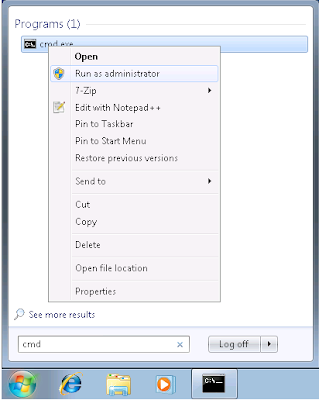
This is very similar to a previous post that I've done, but I thought it is worth mentioning since this is done differently than XP. I wanted to create a shortcut to a shared folder for all users that log in to a Windows 7 machine. In XP, you can just create a shared folder in shared documents, and create a shortcut to it in the all users desktop. In Windows 7 you can't do this, so you'll have to create a symbolic link. 1. Create the folder you want to link. I just created a folder named "Shared" in C:\Users\Public\Documents. Everyone already has access to this folder, but it's not super easy to find. 2. Open the command prompt as administrator. (find "cmd" and right-click then click run as admin, you'll see administrator in the window title) 3. Run this command to create the link:  "mklink /J C:\Users\Public\Desktop\Shared C:\Users\Public\Documents\Shared"

Move Windows 7 Users folder to another drive

Image
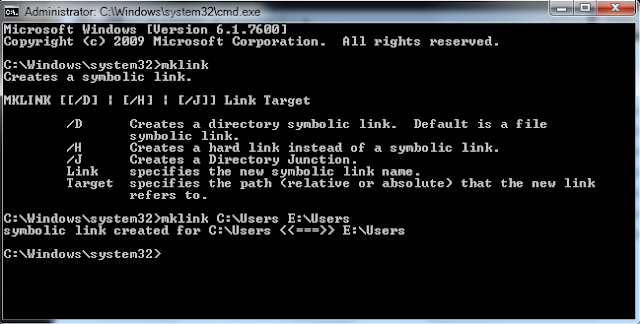
If you've already installed your operating system and want to move the entire Users folder to another drive use these instructions. This will create a symbolic link which will leave the operating system using the same path to avoid breaking anything pointed to the Users through the C drive. You will still be able to get to this directory through the normal C:\Users path. This is an alternative to making changes with the unattend.xml file on installation. Moving the Users Folder 1. Copy C:\Users to your secondary drive, or wherever you want it to be located. This works best if you boot into a Linux disc or some other boot drive since windows will lock files while you are logged in. If you have a WinPE disc, you can make all these changes at once. 2. Rename, delete, or move the original folder after making sure that the files have copied. It is difficult to rename that folder while you are logged in to the operating system, so I would do this step while booted to another drive....

Windows 7 Drivers for ASRock 939dual-SATA2

Image
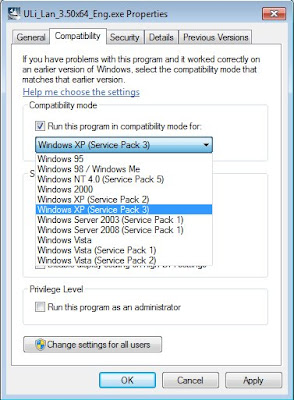
I recently installed Windows 7 Pro x64 on my desktop and almost all of the drivers were automatically installed. Two important ones were not: Onboard LAN and my SB Audigy 2 card. The ASRock website ( http://www.asrock.com/mb/download.asp?Model=939Dual-SATA2&s=939 ) only has XP drivers, which won't work unless you run it in compatibility mode. This is pretty simple: Windows 7 Compatability Mode: 1. Right click on executable 2. Select properties 3. Click on the Compatability tab 4. Check "Run this program in compatibility mode for:" 5. Select Windows XP (Service Pack 3) 6. Click OK and run the program As for the audio, since I don't use the onboard audio I haven't checked to see if it works although I have read about other people having issues. Even though this board has 7.1 channel sound I don't recommend using it because there was a lot of static noise. At least for me.