Posts

Change your blog URL to dot com

Image
I haven't had a ton of experience with blogs, so I wan't sure if I could purchase a domain name and still have my blog hosted by blogspot. I was thinking that I would have to purchase from godaddy.com and do some funny business like redirecting to my blog website, or move the content and possibly pay for server space. I've seen some solutions say that you need to move where your hosted content is if you want to get a .com, .net or something similar. Google has made it super easy to change the URL (if you purchase the domain from them). Domains from Google are $10/year which is reasonable. I don't know if WordPress or other blogging sites have options to purchase domains, but it only makes sense. The good news is that the old URL and new URL both work, so your countless hours of SEO won't be wasted. This website is available from both places: www.yanzzee.com yanzzee.blogspot.com Making the change was super easy, but was still new to me, so this is what I did: ...
Move Windows 7 Users folder to another drive

Image
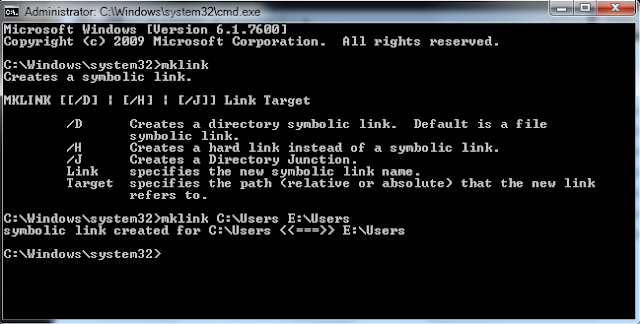
If you've already installed your operating system and want to move the entire Users folder to another drive use these instructions. This will create a symbolic link which will leave the operating system using the same path to avoid breaking anything pointed to the Users through the C drive. You will still be able to get to this directory through the normal C:\Users path. This is an alternative to making changes with the unattend.xml file on installation. Moving the Users Folder 1. Copy C:\Users to your secondary drive, or wherever you want it to be located. This works best if you boot into a Linux disc or some other boot drive since windows will lock files while you are logged in. If you have a WinPE disc, you can make all these changes at once. 2. Rename, delete, or move the original folder after making sure that the files have copied. It is difficult to rename that folder while you are logged in to the operating system, so I would do this step while booted to another drive....

Remove Ads from most websites

Image
The web is a lot nicer without ads all over the place. There are a few tools out there that are designed to remove ads from your web experience, some more functional than others. I've tried a few, and by far, the best is Ad-block plus which is only on Firefox. There's an add-on in Chrome called ad-sweep, but I've tested, and there's still a lot of ads that come through. Too bad, since I really like Chrome otherwise. Ad-Block Plus is easy to install, so I'll just direct you to their website: http://adblockplus.org/en/ Alternatively, you can just click tools, add-ons, get add-ons, and search for "ad-block plus". You'll want to subscribe to the "EasyList" to get current lists of ad urls. You can temporarily disable it from the icon that it puts in your web browser. Typically I hate adding toolbars or anything to my web browser, but this isn't that big, and is a must since the only thing more annoying than toolbars is ads. Below is an e...

Bypass Cisco NAC Agent

Image
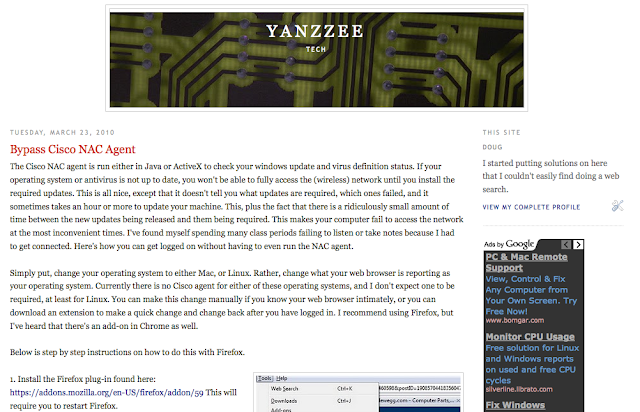
The Cisco NAC agent is run either in Java or ActiveX to check your windows update and virus definition status. If your operating system or antivirus is not up to date, you won't be able to fully access the (wireless) network until you install the required updates. This is all nice, except that it doesn't tell you what updates are required, which ones failed, and it sometimes takes an hour or more to update your machine. This, plus the fact that there is a ridiculously small amount of time between the new updates being released and them being required. This makes your computer fail to access the network at the most inconvenient times. I've found myself spending many class periods failing to listen or take notes because I had to get connected. Here's how you can get logged on without having to even run the NAC agent. Simply put, change your operating system to either Mac, or Linux. Rather, change what your web browser is reporting as your operating system. Currently the...

Web PDFs open in Acrobat Pro instead of Reader

Image
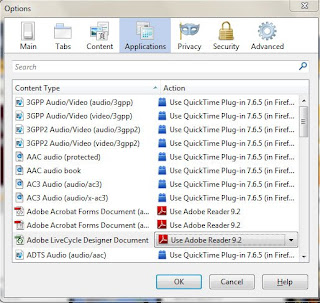
I have seen this problem a couple of times with Acrobat Pro 8.1 installed and Adobe Reader 9. When opening a pdf file in Firefox, it will attempt to open Acrobat Pro instead of Reader and gets an error. It seems like Reader is also opening, but it is really annoying to have to close Acrobat every time. I've set the default program to Reader, but it still opens Acrobat. Updating also did not solve anything. I've looked on forums and could not find this specific problem so I'm writing it here. The first solution I found was to install Adobe CS4 (Acrobat Pro 9). Although this fixed the problem, I don't think it's a very good solution since Adobe products can get pricey. I just figured out that you can change the applications that Firefox uses. Here's how it's done: 1. Open Tools then Options... 2. Click on Applications 3. Find the Adobe Acrobat Forms Documents and select Choose Other... 4. Find the Reader exe (probably AcroRd32.exe This seems to wor...

Active Directory Users and Computers and Group Policy Management

I keep forgetting where to get the tool to install these two programs: Active Directory Users and Computers  Group Policy Manageme nt They are both in the same package, but the package is different depending on what version of windows you have. It used to be called the Administration Tools Pack , but now it is called the Remote Server Administration Tools . It throws me off every time I try to search for it. Hopefully this will save someone a few minutes of searching. Links are below. Windows XP or Server 2003 Windows Server 2003 Administration Tools Pack (adminpak.exe or just adminpak) http://www.microsoft.com/downloadS/details.aspx?FamilyID=c16ae515-c8f4-47ef-a1e4-a8dcbacff8e3&displaylang=en Vista x86 Microsoft Remote Server Administration Tools for Windows Vista http://www.microsoft.com/downloads/details.aspx?FamilyId=9FF6E897-23CE-4A36-B7FC-D52065DE9960&displaylang=en Vista x64 Microsoft Remote Server Administration Tools for Windows Vista for x64-based ...

My Favorite Free Software

I wish I had a list like this ten years ago. 1. Linux. Although I'm still a nooj with linux, it is changing the world. You can do anything with it. (except get paid to write it) The inexperienced like me can get Ubuntu or LinuxMint installed pretty easily. If you can't get that to work then stick to using Geek Squad. 2. Sun VirtualBox . VirtualBox lets you run a VM on your computer similarly to Parallels or VMWare Fusion. I mostly use it to try and figure out operating systems that I have never used before but don't want to take the time to install it natively. If you have a MAC then it is a must, unless you are anti-windoze. 3. IMGBurn . Want to rip or burn a disk to ISO? Use this program to backup almost any disk. This program worked where Roxio failed. 4. Daemon Tools Lite . Mount those ISOs onto a virtual drive, now you can get a netbook! 5. DVD Shrink . Backup video DVDs with good quality and a few options. 6. CDEx . Extract your audio CDs to MP3. Yet another rea...