Posts

Remove browser hijacker malware

For conduit, white smoke, babylon, anything opencandy ( http://en.wikipedia.org/wiki/OpenCandy ), and other browser hijackers I usually do the following. 1. uninstall these and anything unrecognizable from add/remove 2. in EACH browser   a. remove any add-ins/extensions   b. change the default web page/home page   c. remove any search engines that you don't recognize, set default to google 3. delete anything from c:\program files, c:\users\appdata that appears to be from the malware 4. run a full scan of Malwarebytes, and possibly other scans 5. probably also a good idea to clear your cache and cookies I also heard that some trovi malware is also changing browser shortcuts on the desktop, and has a scheduled task to change these shortcuts. I haven't seen this personally, but it's worth checking. Apparently ADWcleaner is good at removing this. My rule of thumb is that if it takes longer than 30 minutes to an hour to fix I'm going to re-install ...
Delay dropbox startup in Windows

Image
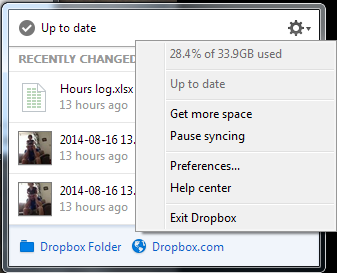
Dropbox was slowing down my startup after logging in, so I wanted to delay startup by a minute or so to allow my computer to be usable earlier. The normal settings only allow it to either start up immediately, or entirely manually. Below are instructions on how I got it to start after 2 minutes. I did this in Windows 7, but it should work similarly in Windows 8, 8.1, and probably Windows 10. This also works with other programs, so you could stagger startup items instead of having them all hammer the system at once. 1. Disable the normal dropbox startup.   a. Click on the dropbox icon, click the gear icon, and click Preferences...   b. Uncheck "Start Dropbox on system startup". Click OK 1. a. Click Preferences... 1. b. Uncheck Start on system startup 2. Open the task scheduler.   a. From the Start menu, click All Programs, Accessories, System Tools, and Task Scheduler.   This can also be found in the control panel under System & Se...

Lockdown Browser 1.0.7.02 LAB SCCM deployment

Image
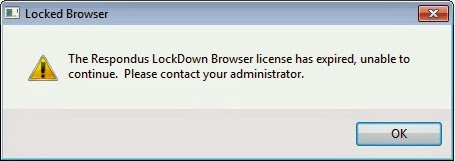
I needed to update from Respondus LockDown Browser Lab version 1.0.5.14 to version 1.0.7.02. This is how I've done it as an SCCM application. This could probably be modified to be used in some other deployment solution, but I've tested it with SCCM 2012 R2 and Windows 7 clients running 32 and 64 bit versions. After 1.0.7.02 was activated this error shows on 1.0.5.14 Install Shield files and installer folder First, you'll need to create setup.iss files. Instructions can be found here:  http://www.respondus.com/update/2009-11-d.shtml Here's their instructions for convenience: First, be sure that Respondus LockDown Browser isn’t already installed on the computer. If it is, then un-install it before continuing. Download the full installer (LockDownSFX.exe) from the Respondus website.  BE SURE  to obtain the .exe via the admin login for your institution since the installer differs for each institution. Run the installer and select the "Click Here...

UNBEATABLE Tic Tac Toe Game

Image
Click the link to download an unbeatable Tic-Tac-Toe game. It's possible to get a CAT game or lose, but the computer will never lose! You can also play two player if you want to have the possibility of winning. https://dl.dropbox.com/u/2509724/TTT.exe One player will be against the computer, two player will be against a friend (same computer) Player one to choose X or O The Computer Wins! I created the program in high school after completing all of the assignments for the class. It was created with Visual Basic 6 with about 1200 lines of code. The program is fully functional, but certainly not polished. It was created pretty simply, e.g. the computer is not performing strategy, just making the pre-programmed best move, as Tic-Tac-Toe is a pretty simple game if you think about it. I also created a minesweeper game similar to the windows one, but I had a few bugs that I could never iron out. Sadly, I think I left that one on the classroom computer and don...

Wild Ones

Image

Bootable external drive for Windows & OSX

Image
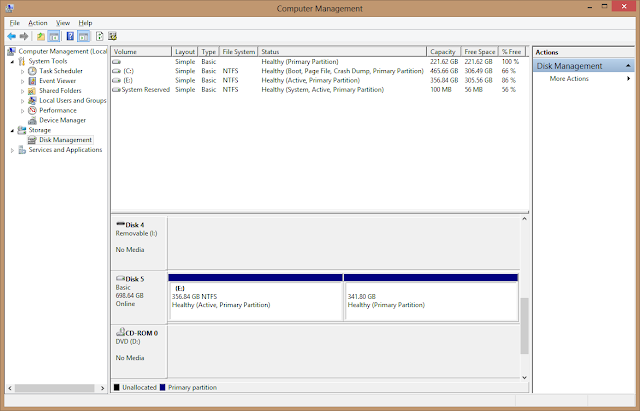
This is how I created a bootable external drive with two partitions: One for WDS/Ghost etc. and the other for OSX install disk. For my drive, I've got a custom WinPE startup OS, and the OS 10.8 install image. The end result is an external drive that I can use to image or backup almost any computer that I come across. Below are the steps that I took to create the drive, but I'll cut to what I got hung up on: The Windows partition must be Active or your machine won't boot to it . Restoring the OSX image will remove this from the NTFS partition. 1. Create your Windows partition. (these steps can also be done in disk management) Run CMD as an administrator (you must right click on CMD and run as administrator, not just be logged in as an administrator)  In CMD, run diskpart  list disk  select disk <#>    clean (! will remove all current partitions !)  create partition primary size=<n> (MB)  active  format fs=ntfs quick...

Windows 7 MySQL installation error service account

Image
When installing MySQL 5.5 on a Windows 7 machine, I received this error: "an unknown error occurred while validating the service account" and the installation would not complete, and I also got a configuration error with something like "unable to configure service". After googling a bit and playing around with the settings, the answer was pretty simple. The default administrator account needs to be enabled . Although this was a pretty easy answer, I couldn't find it anywhere! Result after enabling the default administrator account Sorry I don't have more screen-shots, but I think it's pretty self explanatory. I may or may not add more later.